Scroll Bar Grab Area Improvement

Hello ScopeAR Team-
We love the custom workspace/windowing UI improvements that came with Create 2.7! They have made it much easier to create in Create. Thank you for that huge improvement.
One drawback we noticed happens when authors adjust Browser Zoom settings and OS Display Scale settings to their liking. Sometimes those settings cause narrow scrollbar grab areas in Create. Sometimes the scrollbar grab area becomes non-existent or only 1~2 pixels wide.
When I mention Browser Zoom and Display Scale, I mean these:

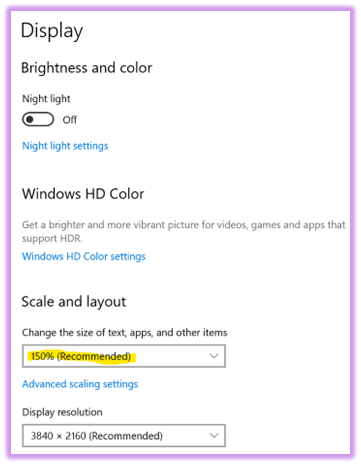
Could you please consider developing a feature improvement that makes scroll bars easier to grab, regardless of the browser zoom or OS scale settings?
The scroll bar and window width adjustment occur in a shared area. In that shared area, the window adjustment is usually much easier to grab than the scroll bar. The window width adjuster seems to be prioritized when grabbing within the shared area.
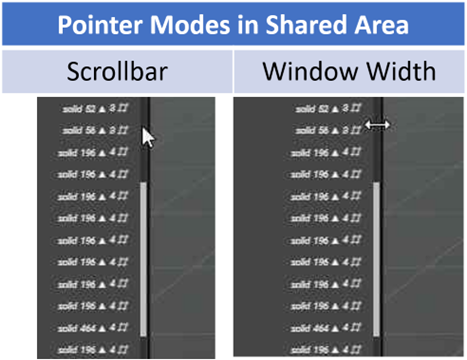
In our authoring team, we need to scroll more often than we need to resize windows. It would be better for us if the shared area was prioritized for scrollbar grabbing. It would be OK if we sometimes had to struggle to grab the window width adjuster.
Better yet, it would be nice if scrollbars had a “minimum pixel width” or something like that. Then, as our authors scale and zoom, they would always have a minimum grabbable area on the scrollbar.
Since we can work around this problem by adjusting browser/OS settings, please consider this request a low priority.
Thanks,
Andy
-

Hi Andrew,
We're very happy to hear the new windowing system we introduced is bringing a lot of value and makes the authoring experience more efficient and enjoyable to work in! It's always motivating to hear that kind of feedback from our users.
As for your feature request, in general we have a high focus on quality of life improvements, so thanks for taking the time to raise this issue and explain it so well.
I created a ticket for this as well (internal reference 2884), and will discuss with the design and development team what our possibilities are. There might be some CSS magic we can do to improve the interaction with the scrollbar. Aside form that, the mouse scrollwheel should also work in each window, for vertical scrolling.
Have a great day!
2 -
As an additional tip, in case you would like to scroll horizontally instead of only vertically, while using the mouse button, you can hold down shift + scrolling the mouse button.
1 -
Hi Gilles-
That’s great advice about using the mouse wheel to scroll vertically and mouse wheel + Shift for horizontal scrolling!
I’ll feed this back to the authors who have been struggling with narrow scrollbars. I think this could be a satisfying solution for them!
This reminds me of when we started wearing HoloLens when working in very narrow/tight areas of our equipment. The users couldn’t move their arms to reposition the UI to a comfortable position. After some thought, our solution was to use voice commands. It’s great when a function has multiple control methods!
Thanks again for a really helpful idea that’s ready to use!
Andy
0 -
Hi Andrew,
With the latest release (2.11.1) you should notice an improvement for the grabbing the scrollbars, especially in the step hierarchy.
Please let us know if everything now works as expected.
Have a great day!
0 -
Hi Gilles,
That's great news, thanks for taking action on it! I'm continuously impressed with Scope AR's development speed.
I checked the scrollbar improvement, and it seems quite helpful. Each time I zoom the browser in further, the scrollbar stays nice and wide. After several adjustments, it eventually just disappears.
That said, I don't personally use strong zoom/scale settings. I'll get feedback from my coworkers that do, and let you know how they like the improvement.
Thanks again,
Andy
0 -
Hi Gilles-
I got a chance to chat with our authors who use strong zoom/scale settings. They are quite happy with the improvement. They said it is a much more comfortable experience for their environment. They were happy to see that the change was made to the Asset Library scroll bar as well.
Thanks again for considering our feature request, as well as doing the work to implement it! Your efforts are appreciated.
Thanks again,
Andy
0 -
Hi Andy,
Thanks so much for taking the time to send this feedback!
We're happy to hear the update was well received.
Also thanks again for your original request, feedback like this is extremely helpful for us to make improvements to the software.
I will extend your message to the team.
Have a great day!
0
Please sign in to leave a comment.
Comments
7 comments