Interactive Mode Environment Color Selection

Hi all, I would love some feedback from other developers here.
Depending on the models within a scenario, it would be useful to have the option to select a different background color while in "Interactive Mode". Having the ability to set the background color makes it easy to distinguish the model from the background in some cases.
A step further would be to be able to add images/sprites to the background "walls" in interactive mode or set your own "skybox".
Thanks Scope Team!
-

Hi Brendan,
Thanks for asking here, I'm sure others have wondered about this very topic. Currently, Create doesn't allow an author to do this the way it should be done(ie: changing the actual environment used). There is a request in the system for this as a feature though.
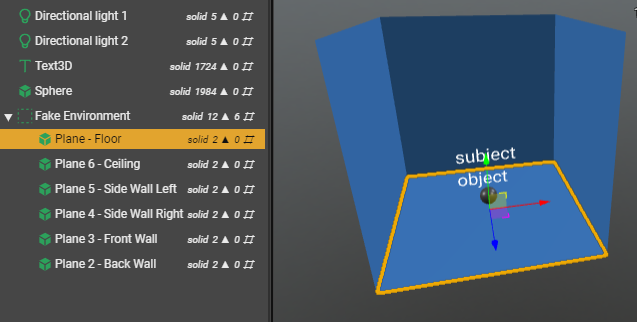
There is however a way to cheat to achieve this but there are cons(listed below) that may result since it is cheating the software. The below explains the way but please use at your own risk.
You can create your own environment objects so long as the backside of the geometry is not visible. You can use Create plane objects and have them facing towards the subject for your project. The plane objects will be invisible from the outside/back side. Each plane has mapping for an image that is equal height and width. If you need more specific texture mapping you will need to create these externally. The size of the environment will need to be a lot larger than the example so test out what works for your project.
The Cons
There could be a negative impact to the pan, zoom, rotation controls used in interactive mode on the app. The controls are calculated based on the overall size of your project. You will need to test this with your project to be sure.
There is also a possibility that any end user could zoom out past the fake environment you have generated for them which could cause confusion. To avoid this as much as you can choose a view on each step with an interactive mode camera that focuses on the subject. This will reduce the amount viewers will need to change it.
Thanks.
1 -

Thanks Jared!
Brendan Chase thanks for your request, we also entered a ticket for this in our backlog (allowing users to set a background color for interactive mode. We will let you know once it becomes a candidate for a release.
0 -

As an Author who targets the HoloLens environment, I have used planes to create a 'backdrop' for inset camera views that are not attached to the main hologram. Which I then encapsulate in a black cube to hide, since black is just not drawn on the HoloLens.
0
Please sign in to leave a comment.
Comments
3 comments