Create timeline Intro/Loop/Outro

Request for an intro/outro possibility for timeline. E.g. first part of the timeline is to be the "intro", which plays once when the step is opened or navigated to. "Loop"- the main part of the step that loops for however long the step is viewed. -And "Outro"- the last section of the timeline which plays when the step is navigated out from.
This would mostly provide more seamless transitions between steps.
-

Hi Raven,
Thank you for your request.
Currently we have worked on a design that would allow authors to define the loop count of a step, but as a general property over all timebars included. Which is of course not the same thing as your request, but I was wondering if this type of feature would also be helpful to you?
In the meanwhile I will discuss your request with our UX designed and creative services team to see if we can come up with a smooth user interaction for your request. Internal ticket reference: 3341
For now a workaround for your request would be:
- Step 1: create your intro animation, end it with a move to step action that moves to step 2, as per the screenshot. This will result in one single play of that animation.
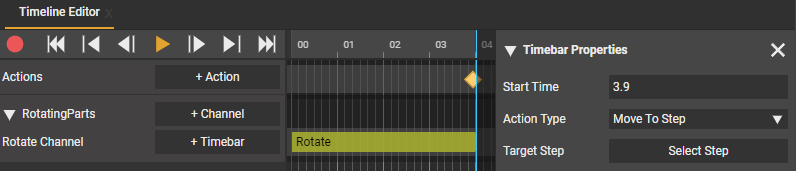 - Step 2: continue from the previous step, add all animtaions you want to loop
- Step 3: Make an animation for the outro animation, end it with a move to step action to step 4, as seen in step 1.
- Step 4: the next step to continue your project.
Of course your request would result in creating a similar behavior in just 1 step instead of 3. So we can definitely see value in that.
0 -
Hi,
Thank you for your help.
Your suggestion accomplished what I wished to do. The option for an intro/outro part of the timeline would still make disappearing/summoning objects smoother by overlapping the intro with the rest of the timebars.
Another request regarding this would be to be able to define the "Previous step" target. If I use a step only for an intro of the next step, going backwards in the instructions has the user go through the intro as well.
Best,
Raven0 -
Hi Raven,
Thank you for your feedback.
In regards to your second request (define a specific target for the previous/next buttons). We are currently working on a complete overhaul of the UI system, that will target better visual consistency between Create and app, as well as a much more powerful system to customize UI. With that, the request you made would also be possible in that system. We are currently targeting a first public release of this new system by the end of this year.
Have a great week!
0
Please sign in to leave a comment.
Comments
3 comments