Apply the transform values to the scene view camera button

The super-useful button "Apply the transform values to the scene view camera" is hard to reach. It is available only if the Step Hierarchy and Object Property are visible while the relevant camera is selected.
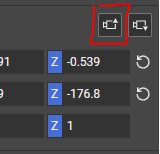
What if you could select it from the top menu bar?
Let's say you use the new UI Editor full screen to add texts to the sequence. The camera values are equal to those of the first step's camera throughout this entire process. Suppose you want to see the current step's camera view. In that case, you need to close the UI Editor, open the Step Hierarchy, choose the camera, open Object Properties, scroll to the "applying..." bottom, reopen the UI editor, and full-screen it. Instead, I suggest a button at the top, always available.
Of course, if you do create such a button, its functionality will be a bit different. Instead of only applying the transform values to the scene view camera, it would first select the "use-for-interactive-mode camera" (in case it's not already selected) and then update the scene view.
-

Hi Ella,
Thanks for this feature request, seems like a valuable improvement indeed.
What do you think about potentially attaching this behavior to the "home" button. (also triggerable by pressing the "Home" shortcut keyboard key, in case you'd like to update the UI Editor preview, without having the scene view actively open)
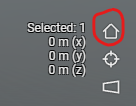 Currently that home button always reverses to a factory default camera position that is not controllable by the user.
But, a new behavior could be:
- If an interactive mode camera is available on a step, move the camera to that position in the scene.
- If there is no interactive mode camera, fly to the factory default.
Would functionality like this also answer to the value you are looking for?
As always, thanks for your input and helping us make the user experience better!
0 -
Sounds really good! It will probably be very intuitive to use....
I didn't know about this shortcut, but I don't use this button, so it sounds like a usable replacement.
By the way, I just tried clicking "home" in the UI Editor, but the shortcut didn't work for some reason. Maybe I should select something for it to work..?
0 -
Thanks for your feedback!
It might be the home button didn't work, when your active focus is in a text field for example, as in that case "home" will apply to the text box, and move the cursor to the beginning of the text box. To make it work in the UI Editor, you might need to click first outside of an area of focus, like a text box, or an input field.
Hope this helps!
0
Please sign in to leave a comment.
Comments
3 comments