Auto tracking/landing toggle?

Hi all! We have a user that is using an iPad for their work, but occasionally the model appears to try and land again and it ends up adjusting the model to be incorrect. The initial landing is always fine. I know there used to be a way to toggle auto tracking off, is that still possible to do? I can't find the info anywhere on it.
-
Hello Will,
Yes, it is still possible to toggle auto tracking off. In the WorkLink App, you can find an AR Settings menu to control how your tracking behaves. Specifically, you can turn off "Object Active Tracking". When it's turned off, the app uses SLAM (Simultaneous Localization and Mapping) after initial recognition, so content remains in place without constant object detection.
Related articles:- WorkLink Scenarios: Placing content and tracking (Object, Image, Surface AR Trackers and Interactive 3D Mode)
- WorkLink Scenarios: Scenario Menu
I hope this helps 😊
0 -
Hello again, Will.
I would like to note that enabling the Precision 3D Object Alignment option will disable access to the Active Object Tracking feature. This occurs because the two rely on mutually exclusive placement rules: Precision Alignment positions the object using multiple poses, while Active Tracking continuously repositions it using a single pose.
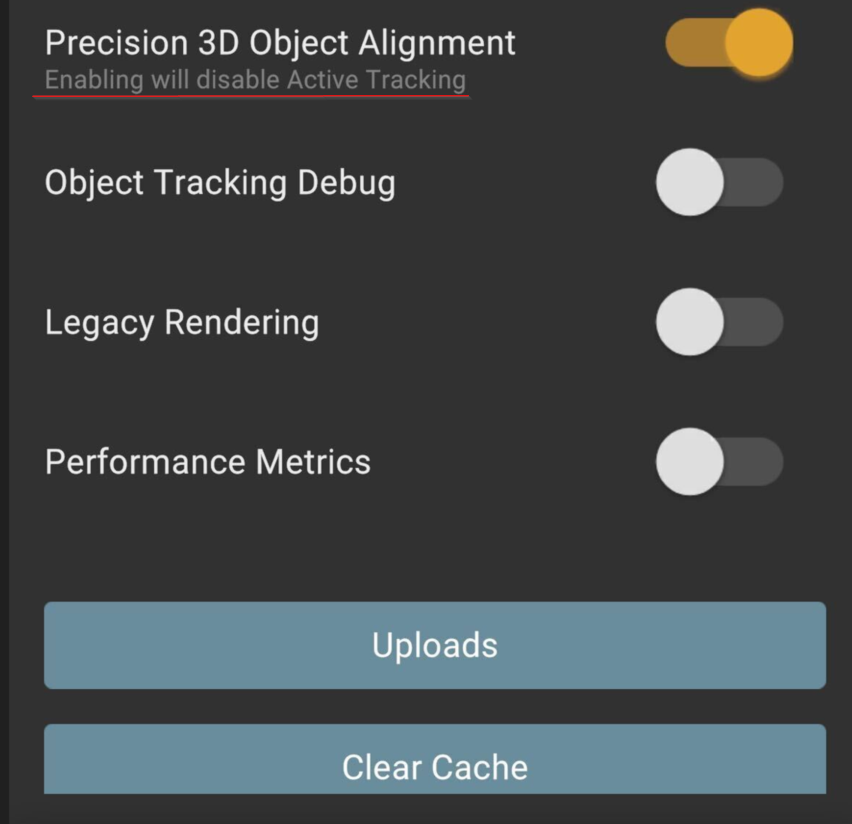
Thank you
0

Please sign in to leave a comment.
Comments
2 comments